

I noticed the appeal of Teleprompter: Vlog & Scripts almost immediately: it turns a phone into a practical speaking aid instead of asking me to memorize a script or keep glancing down at a sheet of paper. That sounds simple, but it changes the experience of recording a tutorial, presentation, short video, or voice-over. I can prepare the words in advance, keep them visible while I speak, and spend more attention on delivery.
After using it beyond the first novelty, I think its real value depends on whether you regularly record yourself or speak from prepared notes. It is not a general writing app, and it will not automatically make a weak script sound natural. What it does well is remove one specific source of friction: losing my place while trying to look at the camera. For that job, it is focused and surprisingly useful.
From an impressive first week to a repeatable recording habit
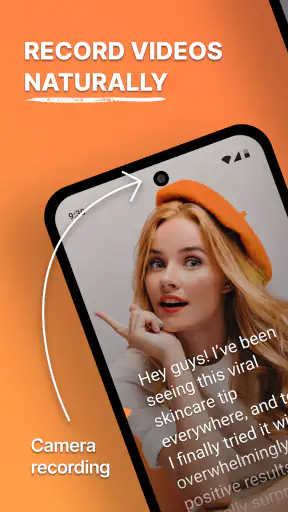
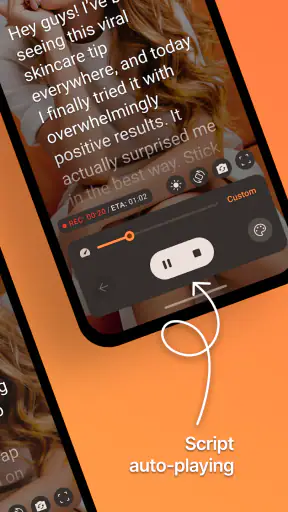
The first week is where the app makes its strongest impression. I can imagine opening it before recording a product explanation, pasting in a prepared script, adjusting the reading flow, and starting without building a complicated setup. The idea is especially helpful when I want to record alone. Instead of stopping every few sentences to check notes, I can keep my attention in one place and maintain a steadier rhythm.
The app belongs to the productivity category, but its practical home is really the space between writing and video production. Solid Labs Co., Ltd has built it around teleprompting rather than surrounding the feature with unrelated planning tools. That narrow purpose is a strength. When I need a script on screen, I do not have to turn a full document editor into a makeshift prompt.
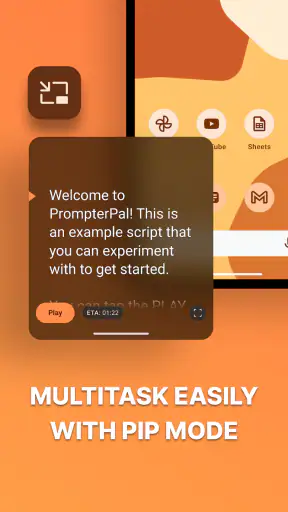
The store summary points to 4K video teleprompter use, floating notes, voice control, and Bluetooth support. In everyday terms, that gives the app several ways to fit into a recording routine. A person filming with a phone may want the script close to the camera view. Someone working with a separate setup may prefer remote control. Another user may need notes that remain available while moving between tasks. These options matter because teleprompter habits are very personal: some people want a completely hands-free flow, while others prefer direct control.
I found that the quality of the experience begins before pressing record. A script written for reading aloud is not the same as an article written for silent reading. Long paragraphs, formal sentences, and dense punctuation make the scrolling feel unnatural. The app can display those words, but it cannot rewrite them into conversational speech. My most useful first-week change was to divide the script into short spoken thoughts, add breathing space, and mark transitions clearly before importing or entering the text.
That preparation also reveals an important trade-off. A teleprompter can make me look more prepared, but it can also make me sound as if I am reading. The closer the text sits to the camera and the smoother the movement, the easier it is to maintain eye contact. Yet if I follow every word too rigidly, my expression becomes flat. I get better results when I treat the scrolling text as a guide rather than a contract. I keep the key wording, but allow myself to pause, emphasize, or rephrase naturally.
For a realistic everyday scenario, imagine a small business owner recording a weekly explanation of a service. Without a prompt, the first take may contain repeated sentences and several stops to remember the next point. With this app, the owner can prepare an opening, three useful points, and a closing request, then record in one continuous session. The benefit is not only speed. It also makes the process less intimidating, which is often what determines whether a person keeps publishing or abandons the idea.
It is free to install, which makes experimenting easy. The app is rated for Everyone, so it is approachable for a broad audience, although the usefulness is more about the user’s activity than their age. The current version is 7.0.4, and it runs on Android 8.0 or later. Those details make it a reasonable option for people who are not using a brand-new phone, while still leaving the usual question of how smoothly demanding video work will feel on older hardware.
The public response is strong: it holds a 4.8 average from around eighteen thousand ratings and has passed one million installs. I do not treat popularity as proof that every workflow will suit me, but those figures do suggest that the basic concept is landing with a substantial audience. The more meaningful test, however, is whether I still open it after the first few recordings.
What makes the first recordings feel easier
The most useful early habit is to separate script preparation from recording. I write or edit the words first, then read the complete script aloud before filming. This exposes awkward phrases that look fine on a screen but are difficult to say. It also helps me judge whether the scrolling pace feels comfortable. If I only discover those problems while recording, I end up blaming the tool for a script problem.
Another practical tip is to keep the opening especially short. The beginning of a recording is where I am most likely to look nervous or lose my place. A compact opening lets me settle into the rhythm before the more detailed material appears. I also prefer placing the main idea near the start rather than spending several lines on background. This is not a special button or hidden mode; it is a workflow improvement that makes the app’s prompt more useful.
Floating notes can be valuable when the script is not enough on its own. I can use a short reminder for a name, a call to action, a technical term, or a question I want to answer. The trade-off is visual clutter. If I fill the screen with too many prompts, I may spend more attention managing the information than speaking. I get better results by limiting floating notes to items I genuinely cannot remember.
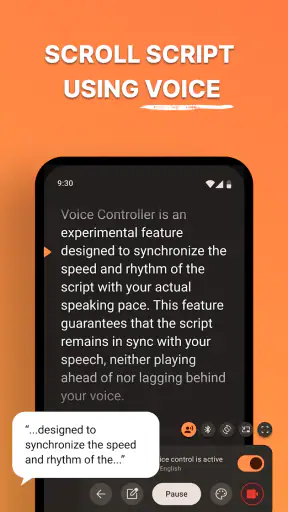
Voice control and Bluetooth support also point toward hands-free or remote operation, but they do not remove the need for a rehearsal. Voice-driven interaction can be convenient when my hands are occupied, yet voice environments are not always perfectly quiet or predictable. Bluetooth control is useful when I want to change the flow without reaching toward the phone, but it adds another piece of equipment or setup to remember. These features are most valuable after the basic script workflow already feels comfortable.
Why it can keep earning space month after month
The app has recurring value when recording is a repeated task rather than a one-off experiment. A creator making regular videos, a teacher preparing lessons, a salesperson practicing demonstrations, or a presenter rehearsing updates can return to the same basic workflow each time. The benefit compounds because the user gradually learns how to write better prompts, where to place pauses, and how much text can be read comfortably in one take.
That is the difference between a novelty and a tool I keep installed. The novelty is seeing words scroll while I speak. The lasting value is reducing the mental load of remembering structure. I can focus on explaining an idea, showing an object, or speaking with more confidence because the next point remains available. The app becomes part of preparation rather than something I open only to try a visual effect.
Its support for high-resolution video is relevant for people who care about recording quality, but I would not assume that the teleprompter alone determines the final result. Lighting, sound, camera stability, and script editing still matter more than the prompt display. A clear script cannot rescue noisy audio, and a sharp image cannot hide a delivery that feels rushed. I see the app as one link in the chain, not a replacement for the rest of the recording setup.
A useful long-term workflow is to create reusable script patterns without copying entire recordings word for word. For example, I might keep a familiar structure for a review: what the product does, how I used it, where it helped, where it frustrated me, and who should avoid it. Each new script can then use the same logical order while retaining a natural tone. This reduces preparation time without making every video sound identical.
Another non-obvious advantage is consistency across repeated takes. When I record without notes, I may accidentally change the order of points or leave out an important qualification. A prompt gives me a stable outline, which is useful when I need to compare versions or record several sections on different days. The limitation is that consistency can become stiffness. I still need to look up from the words emotionally, even if the structure stays fixed.
For presentations, the app is most helpful when the audience is not supposed to notice the support. A full script may be too demanding to follow while trying to connect with people in the room. In that situation, short prompts and transition phrases are better than paragraphs. I would use it as a safety net for the order of ideas, figures, or questions, not as a reason to read every sentence aloud.
People who record only once or twice may not gain enough from learning the workflow. A normal notes app can be faster for a quick reminder, especially if the user is comfortable improvising. Likewise, someone who needs deep project management, collaborative editing, or extensive document organization may be better served by a broader productivity platform. This app earns its place when the repeated act of speaking to camera is the problem being solved.
The maintenance work that decides whether I keep it
Every teleprompter app creates a small maintenance burden: scripts must be edited, pacing must be checked, and the recording position must remain practical. This one does not eliminate that work. If I leave old drafts untouched, the app can become a storage space for scripts I no longer need. A simple routine helps: prepare only the next few recordings, remove obsolete text, and read each script aloud before using it.
Script length is another maintenance issue. A long document may seem efficient because everything is in one place, but it can make navigation and pacing harder. I prefer separate sections for separate recording goals. That makes it easier to restart after an interruption and reduces the risk of scrolling past an important point. It also keeps a short video from feeling like a chapter of a book.
Device placement deserves attention too. A prompt is useful only if I can read it without visibly shifting my eyes away from the audience or camera. If the phone is too low, I look down. If the text is too small, I squint. If the movement is too fast, I rush. I would spend a few minutes positioning the device and testing a short paragraph before recording the full piece. That small check prevents a surprising amount of wasted time.
Older phones may also affect the experience, particularly when recording high-resolution video while displaying a moving script. The minimum operating-system requirement is Android 8.0, but compatibility is not the same as identical performance on every device. If the phone struggles with camera work generally, I would keep the script concise, close unnecessary tasks, and test the complete setup before relying on it for an important recording.
The free starting point is helpful, but in-app purchases range from $1.99 to $59.99 per item. That makes it sensible to begin with the workflow I actually need rather than assuming every optional purchase is necessary. I would first confirm that the reading style, device position, and control method fit my routine. If the app becomes a frequent tool, paying for a feature that removes a repeated annoyance may be reasonable; if I record rarely, the free experience may be enough.
Where fatigue appears after the novelty fades
The first source of fatigue is reading itself. Even with a well-designed prompt, I can become overly dependent on the moving text. My voice loses variation, my pauses become mechanical, and my attention shifts from the person watching to the next line. The solution is not to scroll faster or add more controls. It is to shorten the script, use keywords where possible, and rehearse the meaning rather than memorizing the exact display.
A second source is setup repetition. If every recording requires adjusting the phone, checking the text, testing the pace, and arranging a remote, the process may feel heavier than simply speaking from memory. This is where a stable physical setup helps. Once I find a reliable position for the device and a comfortable script format, I can reduce the number of decisions before each session. The app supports a habit best when the surrounding routine is also predictable.
There is also a creative limitation. A teleprompter encourages planned delivery, which is excellent for accuracy but less suitable for spontaneous conversation. Interviews, casual updates, and videos built around genuine reactions may sound less natural if every thought is written in advance. I would choose ordinary notes or no prompt at all when the value comes from responding in the moment.
Bluetooth control can introduce its own friction if the remote is misplaced, disconnected, or simply unnecessary for a short recording. Voice control may be more convenient in one setting and less comfortable in another. I would not build my entire workflow around one control method until I had tested it in the room where I normally record. The strongest approach is to keep a simple fallback: a short script and direct touch control.
Another fatigue point is the temptation to over-script. When every sentence is visible, I may write too much and then feel obligated to say it all. That makes recordings longer and editing more difficult. I have found that a prompt works better when it protects the structure while leaving room for human delivery. A few carefully chosen lines can guide a complete explanation more effectively than a wall of text.
For users who need advanced collaboration, complex version history, or a shared editorial pipeline, this focused tool may feel limited compared with a full writing or production suite. Its advantage is immediacy, not comprehensive project administration. I would choose a broader alternative when several people must revise scripts, approve changes, and manage assets in one place. I would choose this app when I am the person writing, recording, and delivering the material.
My long-term verdict on keeping it installed
I think Teleprompter: Vlog & Scripts earns lasting space for people who speak on camera often enough to benefit from a repeatable prompt routine. Its strongest contribution is practical: it helps me hold a prepared structure in view while keeping more attention on delivery. Floating notes, voice control, Bluetooth support, and high-resolution video compatibility give it flexibility, but the core value remains the same. It makes prepared speaking less stressful.
I would recommend it to a solo creator who is tired of restarting recordings, a professional who needs dependable talking points, or a learner practicing presentations. I would also recommend it to someone who has good ideas but keeps postponing video because memorizing a script feels uncomfortable. The app lowers that barrier without requiring a large production system.
I would be more cautious for occasional users, spontaneous presenters, and people looking for a complete writing or video-editing workspace. They may find a regular notes tool quicker, or a broader platform more suitable. I would also warn anyone expecting the app to improve the script automatically or make every performance sound natural. The user still has to edit for speech, rehearse the flow, and decide when to look beyond the words.
Solid Labs Co., Ltd has kept the product focused enough that its usefulness is easy to understand. It is free to try, available for a wide range of Android devices beginning with Android 8.0, and carries an Everyone age rating. The strong 4.8 average and more than one million installs show broad interest, while the version 7.0.4 label indicates an established product rather than a first experiment. I still judge it by routine, not by those signals.
My final test is simple: after the first month, does opening it save me time or add another chore? For regular recording, it saves time once I adopt short scripts, sensible pacing, and a fixed setup. For rare recording, it may remain an unnecessary layer between an idea and a camera. The app is worth keeping when it becomes a quiet part of preparation, not the main event. Used that way, it is a practical productivity tool with genuine recurring value rather than a teleprompter novelty I forget after one trial.


